

 By
By Apple released iOS 27.0.1 on September 29, 2026, addressing a rebooting bug that affected iPhone 18 Pro and iPhone 18 Pro Max users. The issue triggered after failed Face ID attempts, causing the phone to freeze and reboot unexpectedly. Apple confirmed to 9to5Mac that the software update resolved the problem.
The bug did not affect the lock screen’s Face ID authentication. Rather, it occurred when attempting to unlock apps protected behind biometric security, such as the Passwords app, Safari private tabs, or other biometrically locked applications. When Face ID failed in these scenarios, the phone stopped responding to touch input and hard rebooted within seconds. Users could locate panic logs documenting the crash within Settings > General > iPhone Storage > System Data > Analytics.
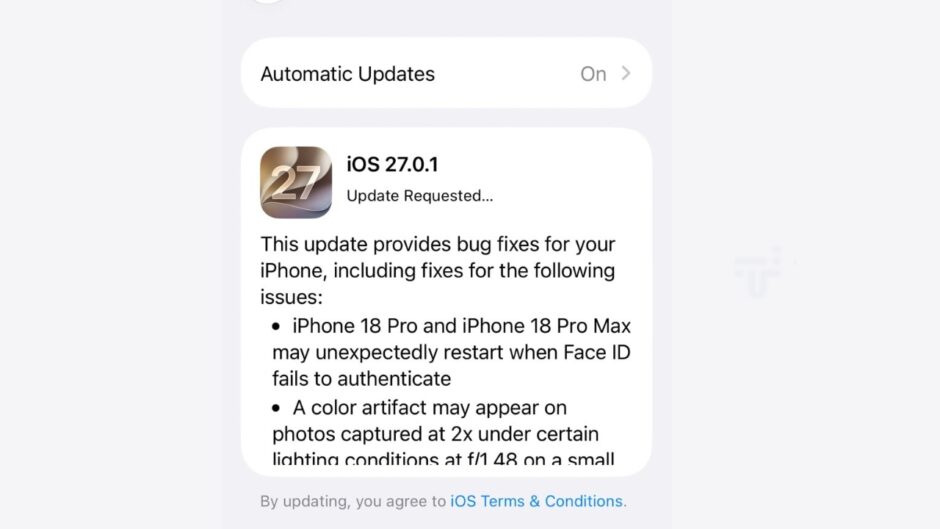
The issue stemmed from the iPhone 18 Pro’s redesigned Face ID sensor system. Apple relocated the Infrared camera behind the display near where the status bar clock renders, shrinking the visible Dynamic Island by approximately 25%. This architectural change introduced a software glitch in the initial iOS 27 release. Early adopter reports indicated the problem was not universal. However, 9to5Mac reproduced the bug on an actual iPhone 18 Pro by obscuring their face and attempting Face ID authentication on the Passwords app, confirming it was reproducible and reasonably widespread.
Apple rolled out the bug-fixing iOS 27.0.1 update early the week of September 28, delivering the patch within the promised timeframe. The company simultaneously pushed watchOS 27.0.1 to address a similar reboot bug plaguing the Apple Watch Series 12 and Ultra 4, addressing multiple device restart issues simultaneously across its product line.
Some customers had already attempted to resolve the rebooting problem by swapping their phone with a new device at Apple, thinking it was a hardware fault. This was unnecessary, as the root cause was software rather than hardware defect. With iOS 27.0.1 now available, users experiencing this issue should update immediately through Settings > General > Software Update.
Whenever millions of devices are released alongside a new OS, there are problems. The iPhone 18 Pro’s launch included a day-one software update, yet this Face ID rebooting issue persisted in the shipping release. Apple’s rapid response timeline allowed the company to identify and resolve the underlying cause within weeks of the initial reports, demonstrating how quickly software fixes can address post-launch issues on flagship devices.
https://www.techjuice.pk/apple-iphone-18-pro-rebooting-bug-ios-27-fix-coming/