
 By
Here’s how to adjust Apple AirPods for small ears
Adjusting AirPods for smaller ears improves the user experience, but may require external accessories.

Your ears are as unique as your fingerprint, with very little chance that two people share the same ear shape. In fact, sometimes even your own two ears aren’t the same shape, and might require a different ear tip size in each ear. AirPods users in particular should seek the best available fit, because a tight fit will help you get the most out of them. A good fit optimizes music playback, bass and noise cancellation performance, while a poor fit means you’ll experience more external noise and a higher chance of your AirPods falling out during workouts.
Apple currently sells two different AirPods models: AirPods 5, which are solid earbuds without ear tips, and AirPods Pro 3, which offer active noise cancellation (not the same as passive noise cancellation) and come with ear tips in multiple sizes. Of course, when trying to decide on the best wireless earbuds to buy, it’s better to choose a set that fits your ears best, even if they’re not made by Apple. However, if you have your heart set on AirPods, there are ways to adjust the fit and improve performance.
How to adjust your AirPods
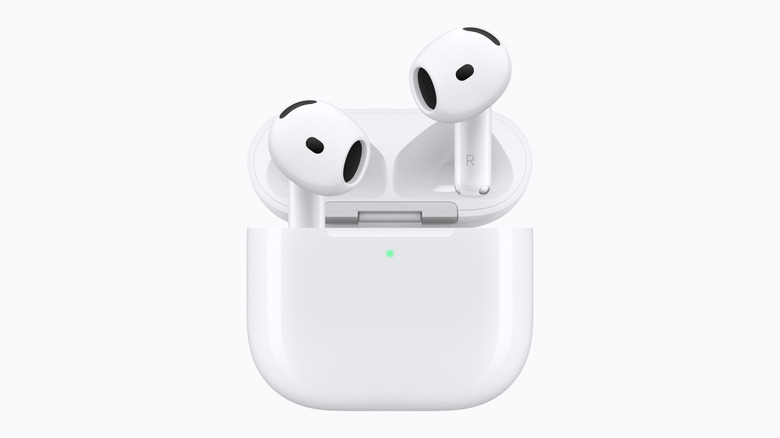
With AirPods that have no ear tips, getting the best fit is limited to pushing them into your ears and rotating the stem toward your face until they lock in place. People with small ear canals may find it difficult to get the tight fit they need, and if that’s the case, these might not be the best AirPods option for you. However, there are third-party AirPods hooks which loop around your ear to hold the earbuds in place from manufacturers such as KeyBudz and AhaStyle. These cost between $10 and $15. Ultimately, some users may achieve a better fit by upgrading to AirPods Pro.
How to adjust the fit with AirPods Pro
AirPods Pro offer ear tips in three to five sizes, depending on the model: the first generation has S, M and L; the second generation has XS, S, M and L; and the third generation has XXS, XS, S, M and L. Out of the box, you’ll find the medium-sized ear tips installed by default, but you should try other sizes to find the tight fit you need.
Remove the current tip by pulling it firmly away from the connector until it snaps off. Align your new tip to the oval base and push until it clicks in place. Try using different sizes in each ear — it’s not unusual to need a small tip in one ear and a medium tip in the other, for example. You can check the seal to make sure you have the appropriate tips by playing bass-heavy music or using Apple’s ear tip test.
Apple’s ear tip test checks your fit
Jonny Evans/ Screenshots
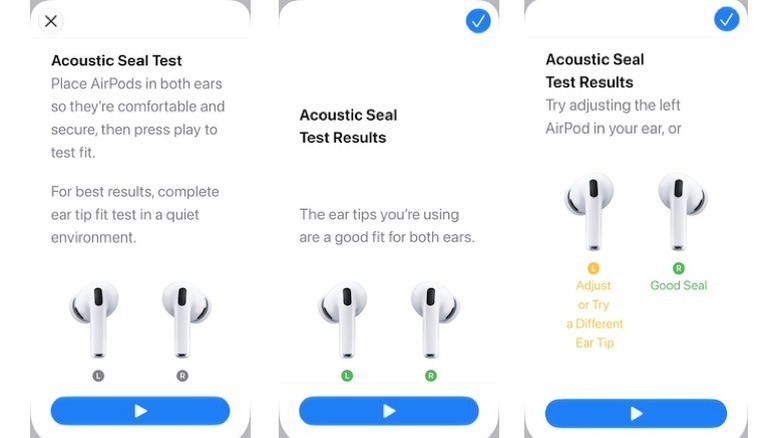
Apple has built an Acoustic Seal Test (an earlier test called Ear Tip Fit Test is available on AirPods Pro 1 or 2) to help you find the best-fitting ear tip. To use it, put your AirPods Pro in your ears, open Settings > [Your AirPods] > Test Acoustic Seal or Ear Tip Fit Test, tap Continue, then Play. You’ll hear a little music, and the test results will tell you if you have a Good Seal or if you need to Adjust or Try a Different Size.
You can also use foam ear tips
Most AirPods Pro ship with ear tips made of silicone, which, if treated correctly, should last as long as the earbuds. The snag is that some people find they aren’t as comfortable or snug-fitting as foam ear tips. Apple has introduced foam-infused tips with AirPods Pro 3, but pure foam tips may still work better for some.
Typically, soft, pliable foam ear tips are compressed before you put them in your ear. Once in place, they expand with your body heat to mold tightly — and comfortably — in your ear canal. The tight seal can help get a good fit even with smaller ears. The drawback is that foam ear tips must be replaced more frequently.
Third-party manufacturers, including Comply and Foam Masters, sell foam ear tips for AirPods Pro for between $25 and $30 per set. When purchasing them, please note that Apple redesigned the ear tip connector used in third-generation AirPods Pro, so make sure you choose tips that are compatible with your model.
https://www.engadget.com/2300409/how-adjust-apple-airpods-for-small-ears/